
- Viewing Comments on Priority Drivers
- Highlighted Comments
- Filtering and Sorting Comments
- Responding to Comments

The best way to utilize comments is to first absorb the quantitative results and then use comments to provide greater context. If you have a low score in a particular driver, check the comments to help you gain greater understanding.
Viewing Comments on Priority Drivers
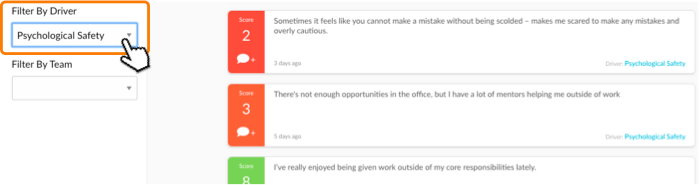
Addressing Priority Driver(s) is a key part of improving your team’s engagement. To understand the underlying issues behind a priority driver, go to the Comments page, use the "Filter by Driver" drop down menu to select the priority driver you want to view the comments for.
Highlighted Comments
Highlighted comments appear at the top of the comments page and are marked with “Highlighted”. These are comments that Perked! has identified as likely to be more relevant and actionable as they meet certain criteria, such as:
- Contain direct advice and/or solutions-oriented feedback driven by Perked!’s text analytics algorithms that looks for certain prescriptive words.
- Relate to extreme scores for the question the comment was left on (high or low)
- Recency to factor in newer comments that are likely to be more relevant than older comments.

Filtering and Sorting Comments by Segment and Sentiment
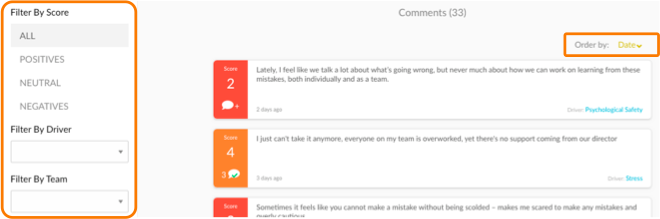
Filtering and sorting comments give you context and focus to better understand your driver scores. You can filter your comments based on:
- Sentiment: Positives, Neutral, Negatives
- Driver category
- Employee Segment (team, department, etc.): This can be enabled via the comments page or Shareable Dashboards (when you create a dashboard that is specific to a segment or a combination of segments).
- Recency
- Highlighted comments
Responding to Comments using the Conversations feature
Perked! provides you the unique ability to enter into a dialogue with employees in response to the comments they share through the survey questions. Doing so, the employee remains anonymous while you can dig deeper to get the extra insight or detail needed to understand and address an issue. Here are best practices for using Perked!’s Conversations feature effectively.